

Step 1: Create PAN Token
Use the Create PAN Token API with thecard_id parameter.
Request:
- Each token can only be used once
- Token expires after 60 seconds
Step 2: Prepare Styles (Optional)
You can customize the iframe appearance by providing CSS styles as a JSON object. The styles need be URL-encoded and passed as a query parameter.Available CSS Selectors
Supported CSS Properties
Global supported properties:color, background-color, font-size, font-family, font-weight, padding, margin, border, border-radius, text-align, line-height, letter-spacing
Step 3: Construct Iframe URL
Build the iframe source URL using the following pattern:Parameters
Environment Domains
- Sandbox:
https://embedded-sandbox.uqpaytech.com - Production:
https://embedded.uqpay.com
Example
Toggle Sensitive Data Visibility
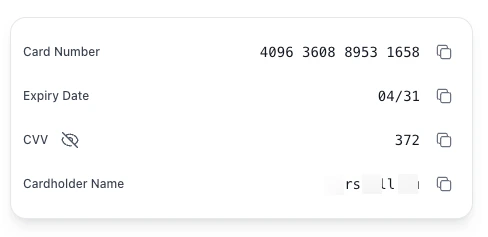
Whenshow_data is not set (or set to false), card number, expiry, and CVV are masked on load. End users can reveal or re-mask the data in two ways:
- Click the eye icon next to the
CVVlabel. The eye icon is persistently visible and toggles all three sensitive fields at once. - Click any masked value directly (
****,**/**,***) to toggle visibility.
show_data=true, the data is shown on load; the eye icon and click-to-toggle behavior remain available for re-masking.
Step 4: Embed Iframe on Your Page
Add the iframe element to your HTML page:Sizing notes:
- The iframe’s internal page has a maximum width of 1280px. If your parent container is wider than 1280px, the rendered card will be capped at 1280px.
- The iframe’s internal container has a minimum height of 400px. Set the iframe
heightto at least400to avoid clipping or scrollbars. - To pin the card to fixed dimensions, set
width/heighton.uq-card-containervia thestylesparameter (see Step 2).