> ## Documentation Index
> Fetch the complete documentation index at: https://developers.uqpay.com/llms.txt
> Use this file to discover all available pages before exploring further.
# Secure Iframe 集成指南
> 通过 Secure Iframe,以符合 PCI 合规的方式展示卡号、过期日期、CVV 等敏感卡信息。
本指南介绍如何集成 Secure Iframe 功能,在无需自身 PCI DSS 合规的前提下展示敏感卡信息。
Secure Iframe 功能让你能以符合 PCI 合规的方式获取敏感卡信息(卡号、过期日期、CVV),无论你自身是否具备 PCI 合规资质。对于需要向持卡人展示卡信息、但没有 PCI DSS 认证的商户来说,这是理想方案。
应用自定义样式后,iframe 渲染效果如下:
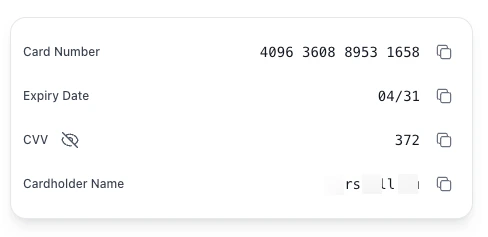 想在集成前先看看效果?可以使用 [沙盒预览工具](https://embedded-sandbox.uqpaytech.com/iframe/preview/),在沙盒环境里调试 iframe 参数和自定义样式。
步骤 1:创建 PAN Token
使用 [Create PAN Token](/zh/card-issuance/v1.6/api-reference/create-pan-token) API,传入 `card_id` 参数。
**请求:**
```bash theme={null}
curl --location --request POST 'https://api-sandbox.uqpaytech.com/api/v1/issuing/cards/{card_id}/token' \
--header 'x-on-behalf-of;' \
--header 'Accept: application/json' \
--header 'x-auth-token: ' \
--header 'x-idempotency-key: '
```
**响应:**
```json theme={null}
{
"token": "pan_eyJhbGciOiJIUzI1NiIsInR5cCI6IkpXVCJ9",
"expires_in": 60,
"expires_at": "2025-11-13T10:31:00Z"
}
```
**说明:**
* 每个 token 只能使用一次
* Token 60 秒后过期
步骤 2:准备样式(选填)
可通过传入 CSS 样式的 JSON 对象自定义 iframe 外观。样式需经过 URL 编码后作为查询参数传递。
```javascript theme={null}
const styles = {
".uq-card-number": {
"color": "#2196F3",
"font-size": "20px",
"font-weight": "600",
"font-family": "Arial, sans-serif"
},
".uq-card-expiry": {
"color": "#4CAF50",
"font-size": "18px",
"font-weight": "500"
},
".uq-card-cvv": {
"color": "#FF9800",
"font-size": "18px",
"font-weight": "500"
},
".uq-card-container": {
"background-color": "#f5f5f5",
"border-radius": "12px",
"padding": "20px",
"border": "1px solid #e0e0e0"
},
".uq-card-label": {
"color": "#666666",
"font-size": "14px"
},
".uq-card-button": {
"background-color": "#2196F3",
"color": "#ffffff",
"border": "none",
"border-radius": "8px"
},
".uq-card-button:hover": {
"background-color": "#1976D2"
},
".uq-card-tooltip": {
"background-color": "#d4edda",
"color": "#155724",
"font-size": "12px",
"border-radius": "4px"
}
};
const encodedStyles = encodeURIComponent(JSON.stringify(styles));
```
可用的 CSS 选择器
| 选择器 | 说明 | 支持的属性 |
| ------------------------ | ------------------------------------ | ----------------------------------------------------------------------------------------- |
| `.uq-card-number` | 卡号 | color、font-size、font-family、font-weight |
| `.uq-card-expiry` | 过期日期 | color、font-size、font-family、font-weight |
| `.uq-card-cvv` | CVV | color、font-size、font-family、font-weight |
| `.uq-card-cardholder` | 持卡人姓名(仅在 `cardholder_name=true` 时渲染) | color、font-size、font-family、font-weight |
| `.uq-card-container` | 容器 | background-color、padding、border、border-radius、width、height、min-height、max-width、min-width |
| `.uq-card-row` | 行布局(每行一个字段——左侧标签,右侧值) | display、justify-content、align-items、flex-direction、gap |
| `.uq-card-label` | 标签文字 | color、font-size |
| `.uq-card-button` | 复制按钮 | color、background-color、border、border-radius、padding |
| `.uq-card-button:hover` | 按钮 hover 状态 | color、background-color |
| `.uq-card-button:active` | 按钮 active 状态 | color、background-color |
| `.uq-card-tooltip` | 复制提示 | color、background-color、font-size、border-radius |
| `.uq-page-background` | iframe 页面背景(默认 `transparent`) | background-color |
支持的 CSS 属性
全局支持的属性:`color`、`background-color`、`font-size`、`font-family`、`font-weight`、`padding`、`margin`、`border`、`border-radius`、`text-align`、`line-height`、`letter-spacing`
步骤 3:构造 Iframe URL
按以下模式构建 iframe 源 URL:
```
{iframe_domain}/iframe/card?token={pan_token}&cardId={card_id}&lang={lang}&styles={encoded_styles}
```
参数
| 参数 | 类型 | 是否必填 | 说明 | 示例 |
| ----------------- | ------- | ---- | ------------------------------------------------------------------------------------------------------------------ | ------------------------------------------ |
| `iframe_domain` | string | 是 | Iframe 服务域名 | `https://embedded-sandbox.uqpaytech.com` |
| `pan_token` | string | 是 | 步骤 1 获取的 PAN token | `pan_eyJhbGciOiJIUzI1NiIsInR5cCI6IkpXVCJ9` |
| `card_id` | string | 是 | 卡标识符(必须与创建 token 时一致) | `7242a504-e43d-4b95-b4c8-f9fc5992d02b` |
| `lang` | string | 否 | 显示语言(默认:`en`) | `en`、`zh`、`zh-TW` |
| `styles` | string | 否 | URL 编码后的 CSS 样式 JSON | URL 编码后的 JSON 对象 |
| `show_data` | boolean | 否 | 加载时直接显示卡号、过期日期、CVV,无需用户操作。建议仅在受信环境中使用(默认:`false`) | `true` |
| `cardholder_name` | boolean | 否 | 渲染持卡人姓名字段。展示值为卡的 `name_on_card`;若未设置,则回退到持卡人的 `first_name + last_name`。可通过 `.uq-card-cardholder` 自定义样式(默认:`false`) | `true` |
环境域名
* **沙盒:** `https://embedded-sandbox.uqpaytech.com`
* **生产:** `https://embedded.uqpay.com`
示例
```javascript theme={null}
const iframeDomain = 'https://embedded-sandbox.uqpaytech.com';
const panToken = 'pan_eyJhbGciOiJIUzI1NiIsInR5cCI6IkpXVCJ9';
const cardId = '7242a504-e43d-4b95-b4c8-f9fc5992d02b';
const lang = 'en';
const styles = {
".uq-card-container": {
"background-color": "#ffffff",
"border": "1px solid #e0e0e0",
"border-radius": "8px"
}
};
const encodedStyles = encodeURIComponent(JSON.stringify(styles));
const iframeUrl = `${iframeDomain}/iframe/card?token=${panToken}&cardId=${cardId}&lang=${lang}&styles=${encodedStyles}`;
```
切换敏感数据显示
未设置 `show_data`(或设为 `false`)时,卡号、过期日期、CVV 在加载时默认以掩码形式显示。终端用户可通过以下两种方式切换显示与隐藏:
* 点击 `CVV` 标签旁的**眼睛图标**。眼睛图标始终常驻显示,可一次性切换全部三个敏感字段。
* 直接点击任意**掩码值**(`****`、`**/**`、`***`)即可切换显示状态。
设置 `show_data=true` 时,数据在加载时直接展示;眼睛图标与点击掩码切换的行为仍然可用,可用于重新隐藏数据。
步骤 4:在你的页面嵌入 Iframe
将 iframe 元素添加到 HTML 页面:
```html theme={null}
```
尺寸提示:
* iframe 内部页面**最大宽度为 1280px**。父容器宽度超过 1280px 时,卡片渲染宽度将被限制在 1280px。
* iframe 内部容器**最小高度为 400px**。建议将 iframe `height` 至少设置为 `400`,避免内容被截断或出现滚动条。
* 如需将卡片固定为指定尺寸,可通过 `styles` 参数为 `.uq-card-container` 设置 `width` / `height`(参见步骤 2)。