> ## Documentation Index
> Fetch the complete documentation index at: https://developers.uqpay.com/llms.txt
> Use this file to discover all available pages before exploring further.
# Recipients (Beneficiary)
> Create, validate, and manage payout beneficiaries through the Dashboard or API.
Recipients and beneficiaries refer to the same party: the person or company that receives funds from a payout. The Dashboard uses "Recipient" in the user interface, while the API uses "Beneficiary" in endpoint names, request fields, and webhook payloads.
You can create and manage beneficiaries from the Dashboard or through the API. Use the API flow when your integration needs to onboard beneficiaries programmatically, validate whether a beneficiary already exists, or maintain beneficiary records for multiple sub-accounts.
## Dashboard flow
1. Sign in to the Dashboard > Select **Global Account**
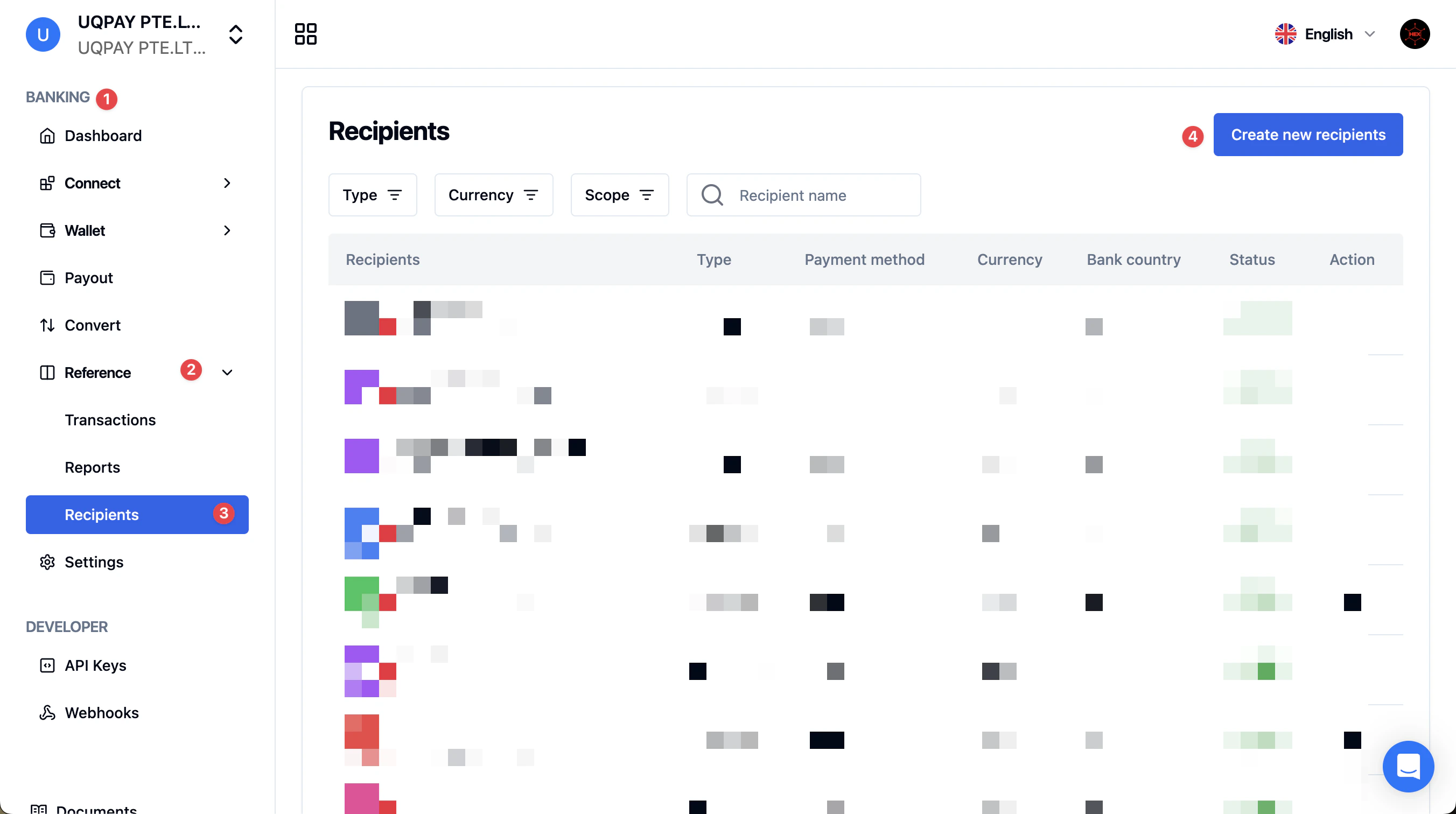
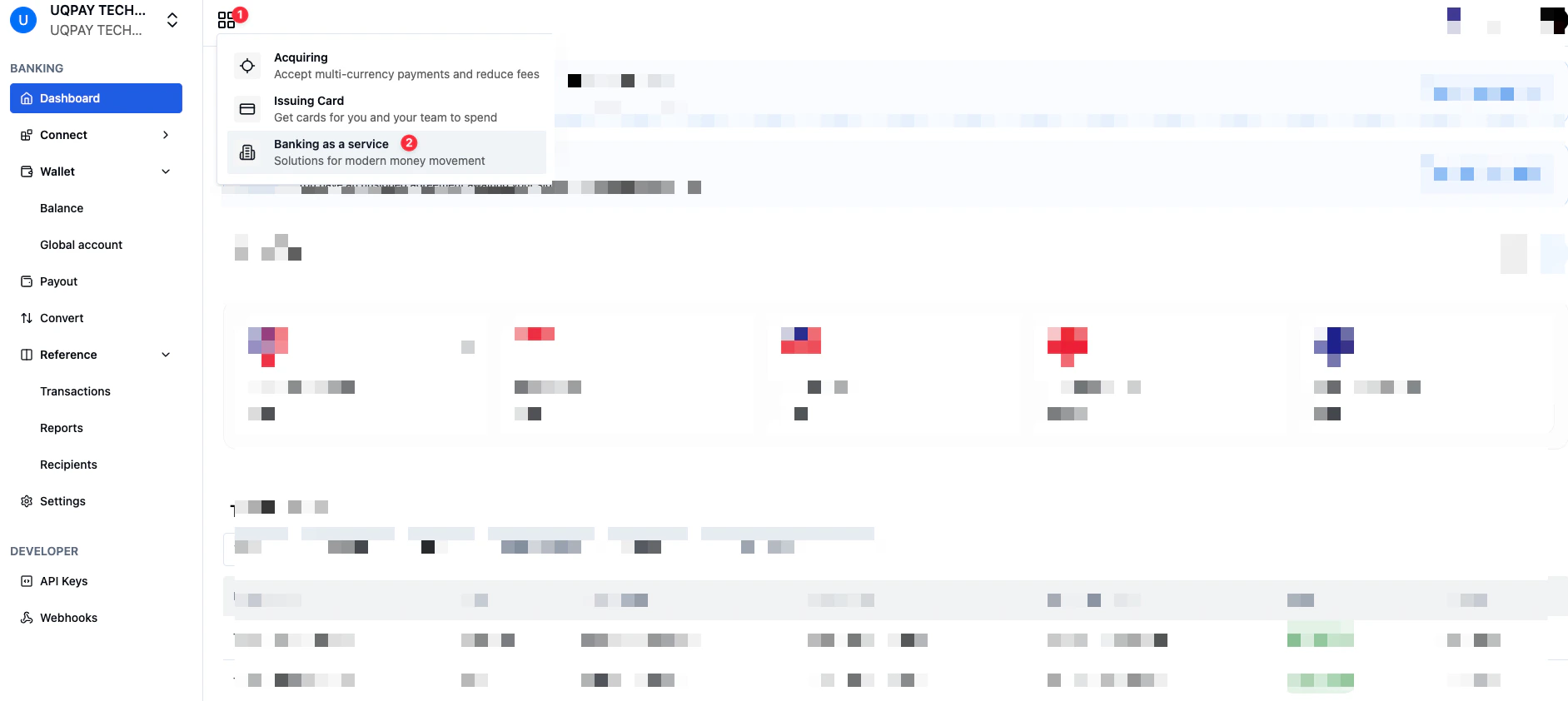 2. Navigate to the **Reference** > **Recipients** screen
3. Click **Create new recipients** in the top-right corner.
2. Navigate to the **Reference** > **Recipients** screen
3. Click **Create new recipients** in the top-right corner.
 ## API integration flow
Use this flow when creating beneficiaries through API:
1. Get supported payment methods for the beneficiary's bank country and currency.
2. Check whether a matching beneficiary already exists.
3. Create the beneficiary if no reusable beneficiary is found.
4. Listen for the beneficiary webhook and retrieve the beneficiary status.
5. Use the `beneficiary_id` when creating payouts.
6. Keep beneficiary records up to date with list, retrieve, update, and delete APIs.
If you manage beneficiaries for a sub-account, pass the sub-account's `account_id` in the `x-on-behalf-of` header for beneficiary APIs. If `x-on-behalf-of` is omitted, the request is executed for the authenticated master account.
## Step 1: List payment methods
Before collecting bank details from your user, call [List Payment Methods](/global-account/v1.6/api-reference/list-payment-methods) with the beneficiary bank country and account currency.
```bash theme={null}
curl --location 'https://api-sandbox.uqpaytech.com/api/v1/beneficiaries/paymentmethods?country=SG¤cy=SGD' \
--header 'Accept: application/json' \
--header 'x-auth-token: {{token}}'
```
The response returns one record per supported `clearing_systems` and `payment_method` combination for that country and currency.
```json theme={null}
{
"data": [
{
"clearing_systems": "FAST",
"country": "SG",
"currency": "SGD",
"payment_method": "LOCAL",
"validation_field": []
},
{
"clearing_systems": "GIRO",
"country": "SG",
"currency": "SGD",
"payment_method": "LOCAL",
"validation_field": []
},
{
"clearing_systems": "LOCAL",
"country": "SG",
"currency": "SGD",
"payment_method": "LOCAL",
"validation_field": []
},
{
"clearing_systems": "MEPS",
"country": "SG",
"currency": "SGD",
"payment_method": "LOCAL",
"validation_field": []
},
{
"clearing_systems": "PAYNOW",
"country": "SG",
"currency": "SGD",
"payment_method": "LOCAL",
"validation_field": []
},
{
"clearing_systems": "RTGS",
"country": "SG",
"currency": "SGD",
"payment_method": "LOCAL",
"validation_field": []
},
{
"clearing_systems": "SWIFT",
"country": "SG",
"currency": "SGD",
"payment_method": "SWIFT",
"validation_field": []
}
]
}
```
Use this response to decide which fields to show in your beneficiary creation form.
| Field | How to use it |
| ------------------ | ----------------------------------------------------------------------------------------------------------------------- |
| `payment_method` | Use `LOCAL` for domestic rails or `SWIFT` for international bank transfers. |
| `clearing_systems` | Put the selected value in `bank_details.clearing_system`, for example `FAST`, `Fedwire`, `Faster Payments`, or `SWIFT`. |
| `country` | Use the two-letter country code as `bank_details.bank_country_code`. |
| `currency` | Use the three-letter currency code as `bank_details.account_currency_code`. |
## Step 2: Prepare beneficiary details
Create Beneficiary supports company and individual beneficiaries.
For a company beneficiary, collect:
* `entity_type = COMPANY`
* `company_name`
* Optional `email` and `nickname`
* `payment_method`
* `bank_details`
* `address`
* `additional_info`, when required by the payout country or currency
For an individual beneficiary, collect:
* `entity_type = INDIVIDUAL`
* `first_name` and `last_name`
* Optional `email`, `nickname`, and `id_number`
* `payment_method`
* `bank_details`
* `address`
* `additional_info`, when required by the payout country or currency
The most important `bank_details` fields are:
| Field | Notes |
| ---------------------------------------------- | --------------------------------------------------------------------------------------------------------------- |
| `bank_country_code` | Two-letter country code of the beneficiary bank. |
| `account_currency_code` | Currency of the beneficiary bank account. |
| `account_holder` | Name on the beneficiary bank account. |
| `account_number` | Required for many local rails. |
| `iban` | Required for many IBAN countries. |
| `swift_code` | Required for SWIFT transfers and some local rails. |
| `clearing_system` | Use a value returned by List Payment Methods. |
| `routing_code_type1` and `routing_code_value1` | Required for some rails, such as `aba`, `ach`, `sort_code`, `bsb_code`, `bank_code`, `ifsc`, or `cnaps_number`. |
| `routing_code_type2` and `routing_code_value2` | Required for some rails, such as branch code for certain CAD EFT payouts. |
Some currencies require `additional_info`. For example, COP payouts require `msisdn`, and may require `id_type` and `id_number` for individual beneficiaries or `tax_id` for company beneficiaries. HKD local payouts also require `msisdn`.
## Step 3: Check for an existing beneficiary
Before creating a new beneficiary, call [Check Beneficiary](/global-account/v1.6/api-reference/check-beneficiary). This helps avoid duplicate records when the same bank account has already been saved.
```bash theme={null}
curl --location 'https://api-sandbox.uqpaytech.com/api/v1/beneficiaries/check' \
--header 'Content-Type: application/json' \
--header 'Accept: application/json' \
--header 'x-auth-token: {{token}}' \
--data '{
"entity_type": "COMPANY",
"company_name": "UQPAY TECHNOLOGY SG PTE LTD",
"account_number": "1234567890",
"payment_method": "LOCAL",
"currency": "SGD",
"bank_country_code": "SG",
"clearing_system": "FAST"
}'
```
If a matching beneficiary exists, the response includes `beneficiary_id`. Reuse that ID when creating a payout.
If no match is found, the response returns an empty `beneficiary_id`.
```json theme={null}
{
"beneficiary_id": ""
}
```
## Step 4: Create the beneficiary
Call [Create Beneficiary](/global-account/v1.6/api-reference/create-beneficiary) only when you do not already have a reusable `beneficiary_id`.
```bash theme={null}
curl --location 'https://api-sandbox.uqpaytech.com/api/v1/beneficiaries' \
--header 'Content-Type: application/json' \
--header 'Accept: application/json' \
--header 'x-auth-token: {{token}}' \
--header 'x-idempotency-key: d75238ce-7e56-474f-a242-77cb100bafc1' \
--data '{
"entity_type": "COMPANY",
"email": "finance@example.com",
"nickname": "Singapore supplier",
"company_name": "UQPAY TECHNOLOGY SG PTE LTD",
"payment_method": "LOCAL",
"bank_details": {
"bank_name": "DBS Bank Ltd",
"bank_address": "12 Marina Boulevard, Singapore",
"bank_country_code": "SG",
"account_holder": "UQPAY TECHNOLOGY SG PTE LTD",
"account_currency_code": "SGD",
"account_number": "1234567890",
"clearing_system": "FAST",
"swift_code": "DBSSSGSG"
},
"address": {
"country": "SG",
"city": "Singapore",
"street_address": "12 Marina Boulevard",
"postal_code": "018982",
"state": "Singapore",
"nationality": "SG"
},
"additional_info": {}
}'
```
The response returns the beneficiary identifiers:
```json theme={null}
{
"beneficiary_id": "e15436e2-35e8-4680-920d-4852940c18ba",
"short_reference_id": "BF250917-WQEQ2D7Q"
}
```
Store the `beneficiary_id`. This is the value you should pass in `beneficiary_id` when creating a payout.
## Step 5: Handle the beneficiary webhook
Subscribe to [Beneficiary Created](/global-account/v1.6/webhooks/beneficiary-created) events.
| Event type | Meaning | Recommended action |
| ------------------------ | ----------------------------------------- | ----------------------------------------------------------------------- |
| `beneficiary.successful` | The beneficiary was created successfully. | Store or activate the beneficiary in your system. |
| `beneficiary.failed` | Beneficiary creation failed. | Mark the beneficiary as failed and ask the user to correct the details. |
After receiving the webhook, you can call [Retrieve Beneficiary](/global-account/v1.6/api-reference/retrieve-beneficiary) to confirm the latest `beneficiary_status`.
```bash theme={null}
curl --location 'https://api-sandbox.uqpaytech.com/api/v1/beneficiaries/e15436e2-35e8-4680-920d-4852940c18ba' \
--header 'Accept: application/json' \
--header 'x-auth-token: {{token}}'
```
Only use an `ACTIVE` beneficiary for payouts. If the beneficiary remains `PENDING`, wait for the final result before initiating payout.
## Step 6: Use the beneficiary in a payout
When creating a payout, pass the saved `beneficiary_id` instead of repeating all beneficiary details.
```json theme={null}
{
"currency": "SGD",
"amount": "1000.00",
"purpose_code": "PROFESSIONAL_SERVICES",
"payout_reference": "INV-2026-001",
"fee_paid_by": "OURS",
"payout_date": "2026-07-10",
"beneficiary_id": "e15436e2-35e8-4680-920d-4852940c18ba"
}
```
Using `beneficiary_id` keeps payout requests smaller and reduces the risk of sending inconsistent bank details.
## Managing beneficiaries
Use these APIs to keep your saved beneficiary records in sync:
| API | When to use it |
| ------------------------------------------------------------------------------- | ------------------------------------------------------------------------------------------------- |
| [List Beneficiaries](/global-account/v1.6/api-reference/list-beneficiaries) | Search and display saved beneficiaries. |
| [Retrieve Beneficiary](/global-account/v1.6/api-reference/retrieve-beneficiary) | Show full beneficiary details before payout or after webhook events. |
| [Update Beneficiary](/global-account/v1.6/api-reference/update-beneficiary) | Correct bank details, address, nickname, or other editable fields. Entity type cannot be changed. |
| [Delete Beneficiary](/global-account/v1.6/api-reference/delete-beneficiary) | Remove a beneficiary that should no longer be used for new payouts. |
## Integration recommendations
* Always call List Payment Methods before designing the input form for a new country and currency.
* Use Check Beneficiary before Create Beneficiary to avoid duplicates.
* Store both `beneficiary_id` and `short_reference_id`.
* Keep a local mapping between your customer or vendor ID and UQPAY `beneficiary_id`.
* Use `x-on-behalf-of` consistently when managing beneficiaries for sub-accounts.
* Do not create payouts until the beneficiary is `ACTIVE`.
* Reuse existing beneficiaries for repeat payouts to the same bank account.
* Use idempotency keys for create and update requests.
## API Doc
* [List Payment Methods](/global-account/v1.6/api-reference/list-payment-methods)
* [Check Beneficiary](/global-account/v1.6/api-reference/check-beneficiary)
* [Create Beneficiary](/global-account/v1.6/api-reference/create-beneficiary)
* [List Beneficiaries](/global-account/v1.6/api-reference/list-beneficiaries)
* [Retrieve Beneficiary](/global-account/v1.6/api-reference/retrieve-beneficiary)
* [Update Beneficiary](/global-account/v1.6/api-reference/update-beneficiary)
* [Delete Beneficiary](/global-account/v1.6/api-reference/delete-beneficiary)
## API integration flow
Use this flow when creating beneficiaries through API:
1. Get supported payment methods for the beneficiary's bank country and currency.
2. Check whether a matching beneficiary already exists.
3. Create the beneficiary if no reusable beneficiary is found.
4. Listen for the beneficiary webhook and retrieve the beneficiary status.
5. Use the `beneficiary_id` when creating payouts.
6. Keep beneficiary records up to date with list, retrieve, update, and delete APIs.
If you manage beneficiaries for a sub-account, pass the sub-account's `account_id` in the `x-on-behalf-of` header for beneficiary APIs. If `x-on-behalf-of` is omitted, the request is executed for the authenticated master account.
## Step 1: List payment methods
Before collecting bank details from your user, call [List Payment Methods](/global-account/v1.6/api-reference/list-payment-methods) with the beneficiary bank country and account currency.
```bash theme={null}
curl --location 'https://api-sandbox.uqpaytech.com/api/v1/beneficiaries/paymentmethods?country=SG¤cy=SGD' \
--header 'Accept: application/json' \
--header 'x-auth-token: {{token}}'
```
The response returns one record per supported `clearing_systems` and `payment_method` combination for that country and currency.
```json theme={null}
{
"data": [
{
"clearing_systems": "FAST",
"country": "SG",
"currency": "SGD",
"payment_method": "LOCAL",
"validation_field": []
},
{
"clearing_systems": "GIRO",
"country": "SG",
"currency": "SGD",
"payment_method": "LOCAL",
"validation_field": []
},
{
"clearing_systems": "LOCAL",
"country": "SG",
"currency": "SGD",
"payment_method": "LOCAL",
"validation_field": []
},
{
"clearing_systems": "MEPS",
"country": "SG",
"currency": "SGD",
"payment_method": "LOCAL",
"validation_field": []
},
{
"clearing_systems": "PAYNOW",
"country": "SG",
"currency": "SGD",
"payment_method": "LOCAL",
"validation_field": []
},
{
"clearing_systems": "RTGS",
"country": "SG",
"currency": "SGD",
"payment_method": "LOCAL",
"validation_field": []
},
{
"clearing_systems": "SWIFT",
"country": "SG",
"currency": "SGD",
"payment_method": "SWIFT",
"validation_field": []
}
]
}
```
Use this response to decide which fields to show in your beneficiary creation form.
| Field | How to use it |
| ------------------ | ----------------------------------------------------------------------------------------------------------------------- |
| `payment_method` | Use `LOCAL` for domestic rails or `SWIFT` for international bank transfers. |
| `clearing_systems` | Put the selected value in `bank_details.clearing_system`, for example `FAST`, `Fedwire`, `Faster Payments`, or `SWIFT`. |
| `country` | Use the two-letter country code as `bank_details.bank_country_code`. |
| `currency` | Use the three-letter currency code as `bank_details.account_currency_code`. |
## Step 2: Prepare beneficiary details
Create Beneficiary supports company and individual beneficiaries.
For a company beneficiary, collect:
* `entity_type = COMPANY`
* `company_name`
* Optional `email` and `nickname`
* `payment_method`
* `bank_details`
* `address`
* `additional_info`, when required by the payout country or currency
For an individual beneficiary, collect:
* `entity_type = INDIVIDUAL`
* `first_name` and `last_name`
* Optional `email`, `nickname`, and `id_number`
* `payment_method`
* `bank_details`
* `address`
* `additional_info`, when required by the payout country or currency
The most important `bank_details` fields are:
| Field | Notes |
| ---------------------------------------------- | --------------------------------------------------------------------------------------------------------------- |
| `bank_country_code` | Two-letter country code of the beneficiary bank. |
| `account_currency_code` | Currency of the beneficiary bank account. |
| `account_holder` | Name on the beneficiary bank account. |
| `account_number` | Required for many local rails. |
| `iban` | Required for many IBAN countries. |
| `swift_code` | Required for SWIFT transfers and some local rails. |
| `clearing_system` | Use a value returned by List Payment Methods. |
| `routing_code_type1` and `routing_code_value1` | Required for some rails, such as `aba`, `ach`, `sort_code`, `bsb_code`, `bank_code`, `ifsc`, or `cnaps_number`. |
| `routing_code_type2` and `routing_code_value2` | Required for some rails, such as branch code for certain CAD EFT payouts. |
Some currencies require `additional_info`. For example, COP payouts require `msisdn`, and may require `id_type` and `id_number` for individual beneficiaries or `tax_id` for company beneficiaries. HKD local payouts also require `msisdn`.
## Step 3: Check for an existing beneficiary
Before creating a new beneficiary, call [Check Beneficiary](/global-account/v1.6/api-reference/check-beneficiary). This helps avoid duplicate records when the same bank account has already been saved.
```bash theme={null}
curl --location 'https://api-sandbox.uqpaytech.com/api/v1/beneficiaries/check' \
--header 'Content-Type: application/json' \
--header 'Accept: application/json' \
--header 'x-auth-token: {{token}}' \
--data '{
"entity_type": "COMPANY",
"company_name": "UQPAY TECHNOLOGY SG PTE LTD",
"account_number": "1234567890",
"payment_method": "LOCAL",
"currency": "SGD",
"bank_country_code": "SG",
"clearing_system": "FAST"
}'
```
If a matching beneficiary exists, the response includes `beneficiary_id`. Reuse that ID when creating a payout.
If no match is found, the response returns an empty `beneficiary_id`.
```json theme={null}
{
"beneficiary_id": ""
}
```
## Step 4: Create the beneficiary
Call [Create Beneficiary](/global-account/v1.6/api-reference/create-beneficiary) only when you do not already have a reusable `beneficiary_id`.
```bash theme={null}
curl --location 'https://api-sandbox.uqpaytech.com/api/v1/beneficiaries' \
--header 'Content-Type: application/json' \
--header 'Accept: application/json' \
--header 'x-auth-token: {{token}}' \
--header 'x-idempotency-key: d75238ce-7e56-474f-a242-77cb100bafc1' \
--data '{
"entity_type": "COMPANY",
"email": "finance@example.com",
"nickname": "Singapore supplier",
"company_name": "UQPAY TECHNOLOGY SG PTE LTD",
"payment_method": "LOCAL",
"bank_details": {
"bank_name": "DBS Bank Ltd",
"bank_address": "12 Marina Boulevard, Singapore",
"bank_country_code": "SG",
"account_holder": "UQPAY TECHNOLOGY SG PTE LTD",
"account_currency_code": "SGD",
"account_number": "1234567890",
"clearing_system": "FAST",
"swift_code": "DBSSSGSG"
},
"address": {
"country": "SG",
"city": "Singapore",
"street_address": "12 Marina Boulevard",
"postal_code": "018982",
"state": "Singapore",
"nationality": "SG"
},
"additional_info": {}
}'
```
The response returns the beneficiary identifiers:
```json theme={null}
{
"beneficiary_id": "e15436e2-35e8-4680-920d-4852940c18ba",
"short_reference_id": "BF250917-WQEQ2D7Q"
}
```
Store the `beneficiary_id`. This is the value you should pass in `beneficiary_id` when creating a payout.
## Step 5: Handle the beneficiary webhook
Subscribe to [Beneficiary Created](/global-account/v1.6/webhooks/beneficiary-created) events.
| Event type | Meaning | Recommended action |
| ------------------------ | ----------------------------------------- | ----------------------------------------------------------------------- |
| `beneficiary.successful` | The beneficiary was created successfully. | Store or activate the beneficiary in your system. |
| `beneficiary.failed` | Beneficiary creation failed. | Mark the beneficiary as failed and ask the user to correct the details. |
After receiving the webhook, you can call [Retrieve Beneficiary](/global-account/v1.6/api-reference/retrieve-beneficiary) to confirm the latest `beneficiary_status`.
```bash theme={null}
curl --location 'https://api-sandbox.uqpaytech.com/api/v1/beneficiaries/e15436e2-35e8-4680-920d-4852940c18ba' \
--header 'Accept: application/json' \
--header 'x-auth-token: {{token}}'
```
Only use an `ACTIVE` beneficiary for payouts. If the beneficiary remains `PENDING`, wait for the final result before initiating payout.
## Step 6: Use the beneficiary in a payout
When creating a payout, pass the saved `beneficiary_id` instead of repeating all beneficiary details.
```json theme={null}
{
"currency": "SGD",
"amount": "1000.00",
"purpose_code": "PROFESSIONAL_SERVICES",
"payout_reference": "INV-2026-001",
"fee_paid_by": "OURS",
"payout_date": "2026-07-10",
"beneficiary_id": "e15436e2-35e8-4680-920d-4852940c18ba"
}
```
Using `beneficiary_id` keeps payout requests smaller and reduces the risk of sending inconsistent bank details.
## Managing beneficiaries
Use these APIs to keep your saved beneficiary records in sync:
| API | When to use it |
| ------------------------------------------------------------------------------- | ------------------------------------------------------------------------------------------------- |
| [List Beneficiaries](/global-account/v1.6/api-reference/list-beneficiaries) | Search and display saved beneficiaries. |
| [Retrieve Beneficiary](/global-account/v1.6/api-reference/retrieve-beneficiary) | Show full beneficiary details before payout or after webhook events. |
| [Update Beneficiary](/global-account/v1.6/api-reference/update-beneficiary) | Correct bank details, address, nickname, or other editable fields. Entity type cannot be changed. |
| [Delete Beneficiary](/global-account/v1.6/api-reference/delete-beneficiary) | Remove a beneficiary that should no longer be used for new payouts. |
## Integration recommendations
* Always call List Payment Methods before designing the input form for a new country and currency.
* Use Check Beneficiary before Create Beneficiary to avoid duplicates.
* Store both `beneficiary_id` and `short_reference_id`.
* Keep a local mapping between your customer or vendor ID and UQPAY `beneficiary_id`.
* Use `x-on-behalf-of` consistently when managing beneficiaries for sub-accounts.
* Do not create payouts until the beneficiary is `ACTIVE`.
* Reuse existing beneficiaries for repeat payouts to the same bank account.
* Use idempotency keys for create and update requests.
## API Doc
* [List Payment Methods](/global-account/v1.6/api-reference/list-payment-methods)
* [Check Beneficiary](/global-account/v1.6/api-reference/check-beneficiary)
* [Create Beneficiary](/global-account/v1.6/api-reference/create-beneficiary)
* [List Beneficiaries](/global-account/v1.6/api-reference/list-beneficiaries)
* [Retrieve Beneficiary](/global-account/v1.6/api-reference/retrieve-beneficiary)
* [Update Beneficiary](/global-account/v1.6/api-reference/update-beneficiary)
* [Delete Beneficiary](/global-account/v1.6/api-reference/delete-beneficiary)