> ## Documentation Index
> Fetch the complete documentation index at: https://developers.uqpay.com/llms.txt
> Use this file to discover all available pages before exploring further.
# Secure Iframe Guide
> Display sensitive card details such as card number, expiry, and CVV in a PCI-compliant manner using the Secure Iframe.
This guide provides instructions for integrating with the Secure Iframe functionality to display sensitive card information without PCI DSS compliance.
The Secure Iframe feature allows you to retrieve sensitive card details (card number, expiry date, CVV) in a PCI-compliant manner, regardless of your PCI compliance status. This is ideal for merchants who need to display card information to cardholders but do not have PCI DSS certification.
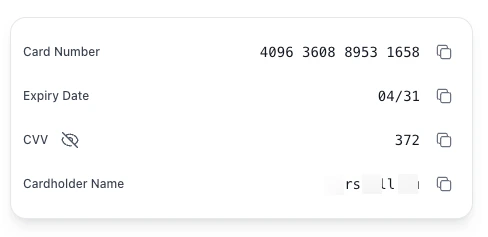
Here's what a rendered iframe looks like with custom styles applied:
 Want to see it in action before you integrate? Use the [Sandbox Preview Tool](https://embedded-sandbox.uqpaytech.com/iframe/preview/) to experiment with iframe parameters and custom styles in the sandbox environment.
## Step 1: Create PAN Token
Use the [Create PAN Token](/card-issuance/v1.6/api-reference/create-pan-token) API with the `card_id` parameter.
**Request:**
```bash theme={null}
curl --location --request POST 'https://api-sandbox.uqpaytech.com/api/v1/issuing/cards/{card_id}/token' \
--header 'x-on-behalf-of;' \
--header 'Accept: application/json' \
--header 'x-auth-token: ' \
--header 'x-idempotency-key: '
```
**Response:**
```json theme={null}
{
"token": "pan_eyJhbGciOiJIUzI1NiIsInR5cCI6IkpXVCJ9",
"expires_in": 60,
"expires_at": "2025-11-13T10:31:00Z"
}
```
**Note:**
* Each token can only be used once
* Token expires after 60 seconds
## Step 2: Prepare Styles (Optional)
You can customize the iframe appearance by providing CSS styles as a JSON object. The styles need be URL-encoded and passed as a query parameter.
```javascript theme={null}
const styles = {
".uq-card-number": {
"color": "#2196F3",
"font-size": "20px",
"font-weight": "600",
"font-family": "Arial, sans-serif"
},
".uq-card-expiry": {
"color": "#4CAF50",
"font-size": "18px",
"font-weight": "500"
},
".uq-card-cvv": {
"color": "#FF9800",
"font-size": "18px",
"font-weight": "500"
},
".uq-card-container": {
"background-color": "#f5f5f5",
"border-radius": "12px",
"padding": "20px",
"border": "1px solid #e0e0e0"
},
".uq-card-label": {
"color": "#666666",
"font-size": "14px"
},
".uq-card-button": {
"background-color": "#2196F3",
"color": "#ffffff",
"border": "none",
"border-radius": "8px"
},
".uq-card-button:hover": {
"background-color": "#1976D2"
},
".uq-card-tooltip": {
"background-color": "#d4edda",
"color": "#155724",
"font-size": "12px",
"border-radius": "4px"
}
};
const encodedStyles = encodeURIComponent(JSON.stringify(styles));
```
### Available CSS Selectors
| Selector | Description | Supported Properties |
| ------------------------ | ---------------------------------------------------------------------- | ------------------------------------------------------------------------------------------------- |
| `.uq-card-number` | Card number | color, font-size, font-family, font-weight |
| `.uq-card-expiry` | Expiry date | color, font-size, font-family, font-weight |
| `.uq-card-cvv` | CVV | color, font-size, font-family, font-weight |
| `.uq-card-cardholder` | Cardholder name (only rendered when `cardholder_name=true`) | color, font-size, font-family, font-weight |
| `.uq-card-container` | Container | background-color, padding, border, border-radius, width, height, min-height, max-width, min-width |
| `.uq-card-row` | Row layout (one row per field — label on the left, value on the right) | display, justify-content, align-items, flex-direction, gap |
| `.uq-card-label` | Label text | color, font-size |
| `.uq-card-button` | Copy button | color, background-color, border, border-radius, padding |
| `.uq-card-button:hover` | Button hover state | color, background-color |
| `.uq-card-button:active` | Button active state | color, background-color |
| `.uq-card-tooltip` | Copy tooltip | color, background-color, font-size, border-radius |
| `.uq-page-background` | Iframe page background (default `transparent`) | background-color |
### Supported CSS Properties
Global supported properties: `color`, `background-color`, `font-size`, `font-family`, `font-weight`, `padding`, `margin`, `border`, `border-radius`, `text-align`, `line-height`, `letter-spacing`
## Step 3: Construct Iframe URL
Build the iframe source URL using the following pattern:
```
{iframe_domain}/iframe/card?token={pan_token}&cardId={card_id}&lang={lang}&styles={encoded_styles}
```
### Parameters
| Parameter | Type | Required | Description | Example |
| ----------------- | ------- | -------- | ------------------------------------------------------------------------------------------------------------------------------------------------------------------------------------------------------------------------- | ------------------------------------------ |
| `iframe_domain` | string | Yes | Iframe service domain | `https://embedded-sandbox.uqpaytech.com` |
| `pan_token` | string | Yes | PAN token from Step 1 | `pan_eyJhbGciOiJIUzI1NiIsInR5cCI6IkpXVCJ9` |
| `card_id` | string | Yes | Card identifier (must match token creation) | `7242a504-e43d-4b95-b4c8-f9fc5992d02b` |
| `lang` | string | No | Display language (default: `en`) | `en`, `zh`, `zh-TW` |
| `styles` | string | No | URL-encoded CSS styles JSON | URL-encoded JSON object |
| `show_data` | boolean | No | Reveal card number, expiry, and CVV on load without a user action. Recommended for trusted environments only (default: `false`) | `true` |
| `cardholder_name` | boolean | No | Render the cardholder name field. The displayed value is the card's `name_on_card`; if not set, the iframe falls back to `first_name + last_name` from the cardholder. Style via `.uq-card-cardholder` (default: `false`) | `true` |
### Environment Domains
* **Sandbox:** `https://embedded-sandbox.uqpaytech.com`
* **Production:** `https://embedded.uqpay.com`
### Example
```javascript theme={null}
const iframeDomain = 'https://embedded-sandbox.uqpaytech.com';
const panToken = 'pan_eyJhbGciOiJIUzI1NiIsInR5cCI6IkpXVCJ9';
const cardId = '7242a504-e43d-4b95-b4c8-f9fc5992d02b';
const lang = 'en';
const styles = {
".uq-card-container": {
"background-color": "#ffffff",
"border": "1px solid #e0e0e0",
"border-radius": "8px"
}
};
const encodedStyles = encodeURIComponent(JSON.stringify(styles));
const iframeUrl = `${iframeDomain}/iframe/card?token=${panToken}&cardId=${cardId}&lang=${lang}&styles=${encodedStyles}`;
```
## Toggle Sensitive Data Visibility
When `show_data` is not set (or set to `false`), card number, expiry, and CVV are masked on load. End users can reveal or re-mask the data in two ways:
* Click the **eye icon** next to the `CVV` label. The eye icon is persistently visible and toggles all three sensitive fields at once.
* Click any **masked value** directly (`****`, `**/**`, `***`) to toggle visibility.
When `show_data=true`, the data is shown on load; the eye icon and click-to-toggle behavior remain available for re-masking.
## Step 4: Embed Iframe on Your Page
Add the iframe element to your HTML page:
```html theme={null}
```
Sizing notes:
* The iframe's internal page has a **maximum width of 1280px**. If your parent container is wider than 1280px, the rendered card will be capped at 1280px.
* The iframe's internal container has a **minimum height of 400px**. Set the iframe `height` to at least `400` to avoid clipping or scrollbars.
* To pin the card to fixed dimensions, set `width` / `height` on `.uq-card-container` via the `styles` parameter (see Step 2).
Want to see it in action before you integrate? Use the [Sandbox Preview Tool](https://embedded-sandbox.uqpaytech.com/iframe/preview/) to experiment with iframe parameters and custom styles in the sandbox environment.
## Step 1: Create PAN Token
Use the [Create PAN Token](/card-issuance/v1.6/api-reference/create-pan-token) API with the `card_id` parameter.
**Request:**
```bash theme={null}
curl --location --request POST 'https://api-sandbox.uqpaytech.com/api/v1/issuing/cards/{card_id}/token' \
--header 'x-on-behalf-of;' \
--header 'Accept: application/json' \
--header 'x-auth-token: ' \
--header 'x-idempotency-key: '
```
**Response:**
```json theme={null}
{
"token": "pan_eyJhbGciOiJIUzI1NiIsInR5cCI6IkpXVCJ9",
"expires_in": 60,
"expires_at": "2025-11-13T10:31:00Z"
}
```
**Note:**
* Each token can only be used once
* Token expires after 60 seconds
## Step 2: Prepare Styles (Optional)
You can customize the iframe appearance by providing CSS styles as a JSON object. The styles need be URL-encoded and passed as a query parameter.
```javascript theme={null}
const styles = {
".uq-card-number": {
"color": "#2196F3",
"font-size": "20px",
"font-weight": "600",
"font-family": "Arial, sans-serif"
},
".uq-card-expiry": {
"color": "#4CAF50",
"font-size": "18px",
"font-weight": "500"
},
".uq-card-cvv": {
"color": "#FF9800",
"font-size": "18px",
"font-weight": "500"
},
".uq-card-container": {
"background-color": "#f5f5f5",
"border-radius": "12px",
"padding": "20px",
"border": "1px solid #e0e0e0"
},
".uq-card-label": {
"color": "#666666",
"font-size": "14px"
},
".uq-card-button": {
"background-color": "#2196F3",
"color": "#ffffff",
"border": "none",
"border-radius": "8px"
},
".uq-card-button:hover": {
"background-color": "#1976D2"
},
".uq-card-tooltip": {
"background-color": "#d4edda",
"color": "#155724",
"font-size": "12px",
"border-radius": "4px"
}
};
const encodedStyles = encodeURIComponent(JSON.stringify(styles));
```
### Available CSS Selectors
| Selector | Description | Supported Properties |
| ------------------------ | ---------------------------------------------------------------------- | ------------------------------------------------------------------------------------------------- |
| `.uq-card-number` | Card number | color, font-size, font-family, font-weight |
| `.uq-card-expiry` | Expiry date | color, font-size, font-family, font-weight |
| `.uq-card-cvv` | CVV | color, font-size, font-family, font-weight |
| `.uq-card-cardholder` | Cardholder name (only rendered when `cardholder_name=true`) | color, font-size, font-family, font-weight |
| `.uq-card-container` | Container | background-color, padding, border, border-radius, width, height, min-height, max-width, min-width |
| `.uq-card-row` | Row layout (one row per field — label on the left, value on the right) | display, justify-content, align-items, flex-direction, gap |
| `.uq-card-label` | Label text | color, font-size |
| `.uq-card-button` | Copy button | color, background-color, border, border-radius, padding |
| `.uq-card-button:hover` | Button hover state | color, background-color |
| `.uq-card-button:active` | Button active state | color, background-color |
| `.uq-card-tooltip` | Copy tooltip | color, background-color, font-size, border-radius |
| `.uq-page-background` | Iframe page background (default `transparent`) | background-color |
### Supported CSS Properties
Global supported properties: `color`, `background-color`, `font-size`, `font-family`, `font-weight`, `padding`, `margin`, `border`, `border-radius`, `text-align`, `line-height`, `letter-spacing`
## Step 3: Construct Iframe URL
Build the iframe source URL using the following pattern:
```
{iframe_domain}/iframe/card?token={pan_token}&cardId={card_id}&lang={lang}&styles={encoded_styles}
```
### Parameters
| Parameter | Type | Required | Description | Example |
| ----------------- | ------- | -------- | ------------------------------------------------------------------------------------------------------------------------------------------------------------------------------------------------------------------------- | ------------------------------------------ |
| `iframe_domain` | string | Yes | Iframe service domain | `https://embedded-sandbox.uqpaytech.com` |
| `pan_token` | string | Yes | PAN token from Step 1 | `pan_eyJhbGciOiJIUzI1NiIsInR5cCI6IkpXVCJ9` |
| `card_id` | string | Yes | Card identifier (must match token creation) | `7242a504-e43d-4b95-b4c8-f9fc5992d02b` |
| `lang` | string | No | Display language (default: `en`) | `en`, `zh`, `zh-TW` |
| `styles` | string | No | URL-encoded CSS styles JSON | URL-encoded JSON object |
| `show_data` | boolean | No | Reveal card number, expiry, and CVV on load without a user action. Recommended for trusted environments only (default: `false`) | `true` |
| `cardholder_name` | boolean | No | Render the cardholder name field. The displayed value is the card's `name_on_card`; if not set, the iframe falls back to `first_name + last_name` from the cardholder. Style via `.uq-card-cardholder` (default: `false`) | `true` |
### Environment Domains
* **Sandbox:** `https://embedded-sandbox.uqpaytech.com`
* **Production:** `https://embedded.uqpay.com`
### Example
```javascript theme={null}
const iframeDomain = 'https://embedded-sandbox.uqpaytech.com';
const panToken = 'pan_eyJhbGciOiJIUzI1NiIsInR5cCI6IkpXVCJ9';
const cardId = '7242a504-e43d-4b95-b4c8-f9fc5992d02b';
const lang = 'en';
const styles = {
".uq-card-container": {
"background-color": "#ffffff",
"border": "1px solid #e0e0e0",
"border-radius": "8px"
}
};
const encodedStyles = encodeURIComponent(JSON.stringify(styles));
const iframeUrl = `${iframeDomain}/iframe/card?token=${panToken}&cardId=${cardId}&lang=${lang}&styles=${encodedStyles}`;
```
## Toggle Sensitive Data Visibility
When `show_data` is not set (or set to `false`), card number, expiry, and CVV are masked on load. End users can reveal or re-mask the data in two ways:
* Click the **eye icon** next to the `CVV` label. The eye icon is persistently visible and toggles all three sensitive fields at once.
* Click any **masked value** directly (`****`, `**/**`, `***`) to toggle visibility.
When `show_data=true`, the data is shown on load; the eye icon and click-to-toggle behavior remain available for re-masking.
## Step 4: Embed Iframe on Your Page
Add the iframe element to your HTML page:
```html theme={null}
```
Sizing notes:
* The iframe's internal page has a **maximum width of 1280px**. If your parent container is wider than 1280px, the rendered card will be capped at 1280px.
* The iframe's internal container has a **minimum height of 400px**. Set the iframe `height` to at least `400` to avoid clipping or scrollbars.
* To pin the card to fixed dimensions, set `width` / `height` on `.uq-card-container` via the `styles` parameter (see Step 2).