> ## Documentation Index
> Fetch the complete documentation index at: https://developers.uqpay.com/llms.txt
> Use this file to discover all available pages before exploring further.
# Fund your issuing balance
> Deposit funds to your issuing balance and manage card-level balances for Single and Share mode cards.
Before cards can transact, your issuing balance must have sufficient funds. How funds flow depends on the card mode:
* **Share mode** — Transactions deduct directly from the issuing balance. The card's `card_limit` acts as a spending cap.
* **Single mode** — Funds are transferred from the issuing balance into the card at creation. The card operates on its own pre-funded balance.
## Deposit to your issuing balance
Use the Dashboard to deposit funds from your banking account into your issuing balance.
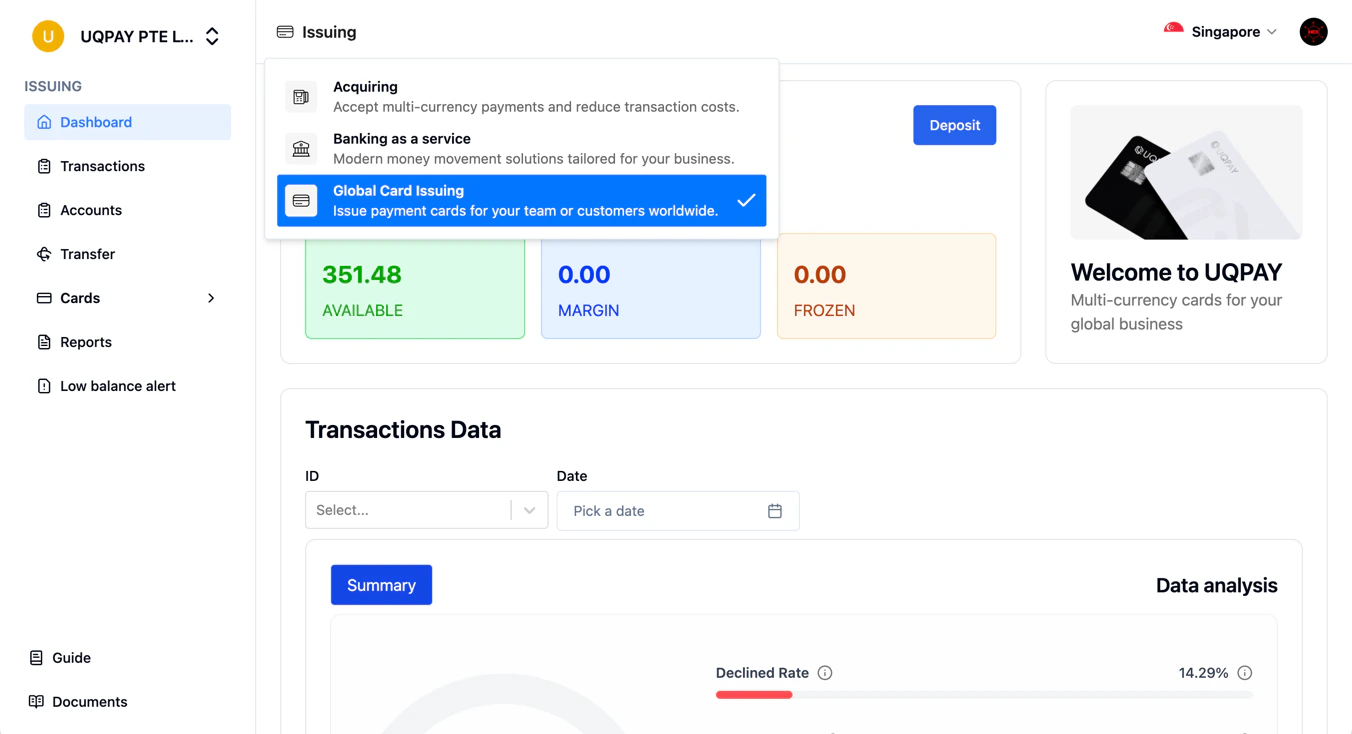
1. Sign in to the Dashboard and select **Card Issuance**.
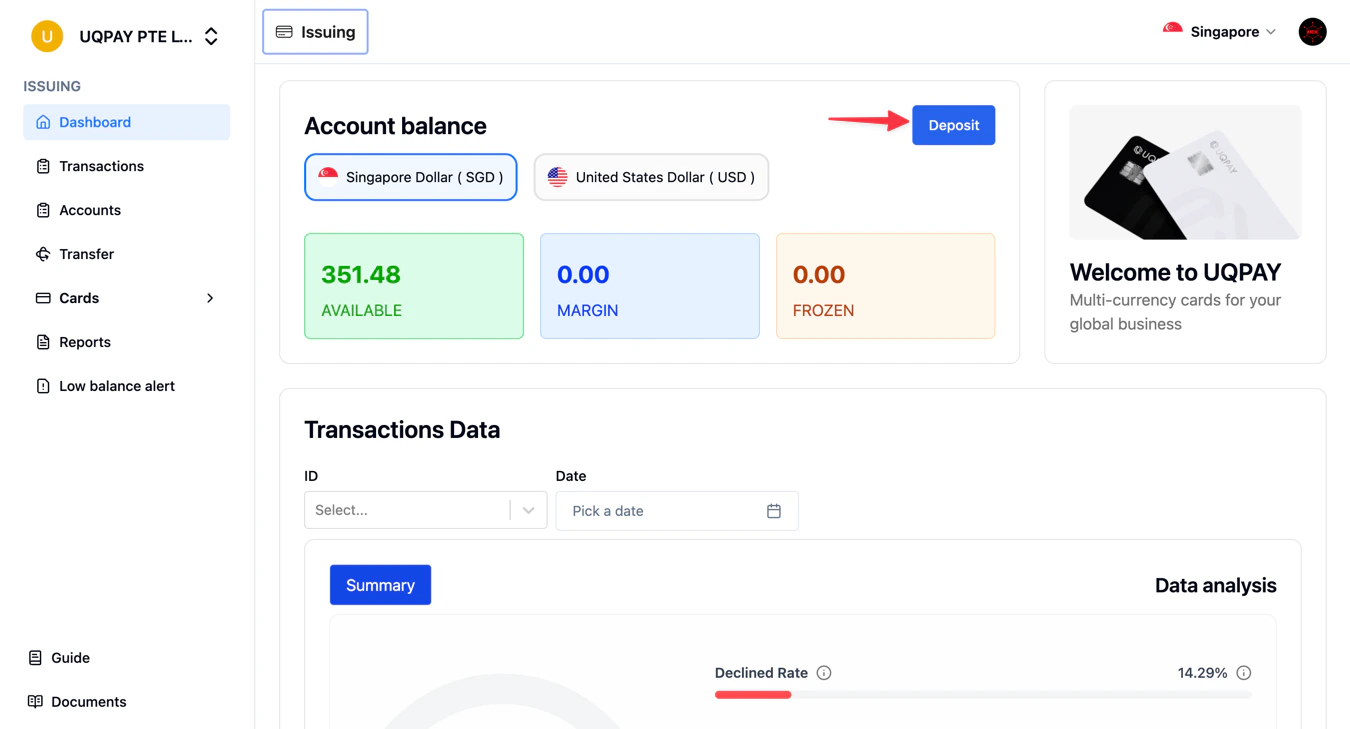
 2. Select the **Deposit** button.
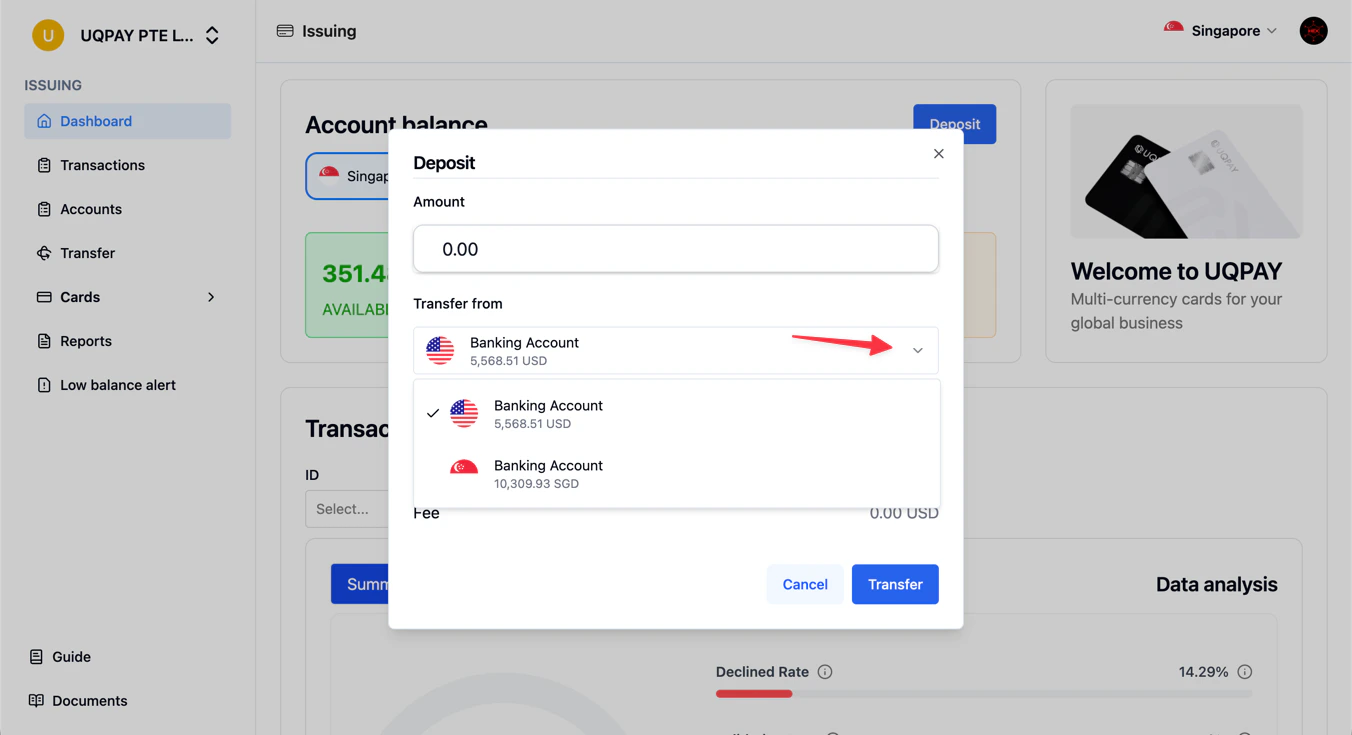
 3. Select the currency (USD or SGD) and enter the amount.
4. Press **Transfer** to process.
3. Select the currency (USD or SGD) and enter the amount.
4. Press **Transfer** to process.
 ## Transfer between main and sub-accounts
If you use sub-accounts, you can transfer funds between your main issuing account and sub-accounts.
**Via API:** Use the [Create Issuing Transfer](/card-issuance/v1.6/api-reference/create-issuing-transfer) endpoint:
```bash theme={null}
curl -X POST https://api-sandbox.uqpaytech.com/api/v1/issuing/transfers \
-H "x-auth-token: YOUR_API_TOKEN" \
-H "x-idempotency-key: $(uuidgen | tr '[:upper:]' '[:lower:]')" \
-H "Content-Type: application/json" \
-d '{
"source_account_id": "main-account-uuid",
"destination_account_id": "sub-account-uuid",
"amount": 5000,
"currency": "USD"
}'
```
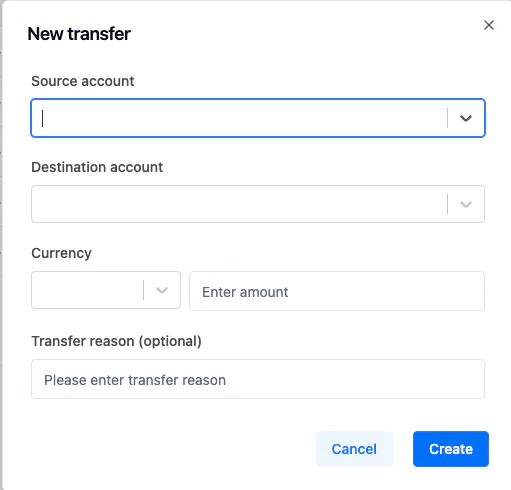
1. Navigate to the **Transfer** screen.
2. Click **New transfer** in the top-right corner.
3. Fill in source account, destination account, and currency.
4. Click **Create**.
## Transfer between main and sub-accounts
If you use sub-accounts, you can transfer funds between your main issuing account and sub-accounts.
**Via API:** Use the [Create Issuing Transfer](/card-issuance/v1.6/api-reference/create-issuing-transfer) endpoint:
```bash theme={null}
curl -X POST https://api-sandbox.uqpaytech.com/api/v1/issuing/transfers \
-H "x-auth-token: YOUR_API_TOKEN" \
-H "x-idempotency-key: $(uuidgen | tr '[:upper:]' '[:lower:]')" \
-H "Content-Type: application/json" \
-d '{
"source_account_id": "main-account-uuid",
"destination_account_id": "sub-account-uuid",
"amount": 5000,
"currency": "USD"
}'
```
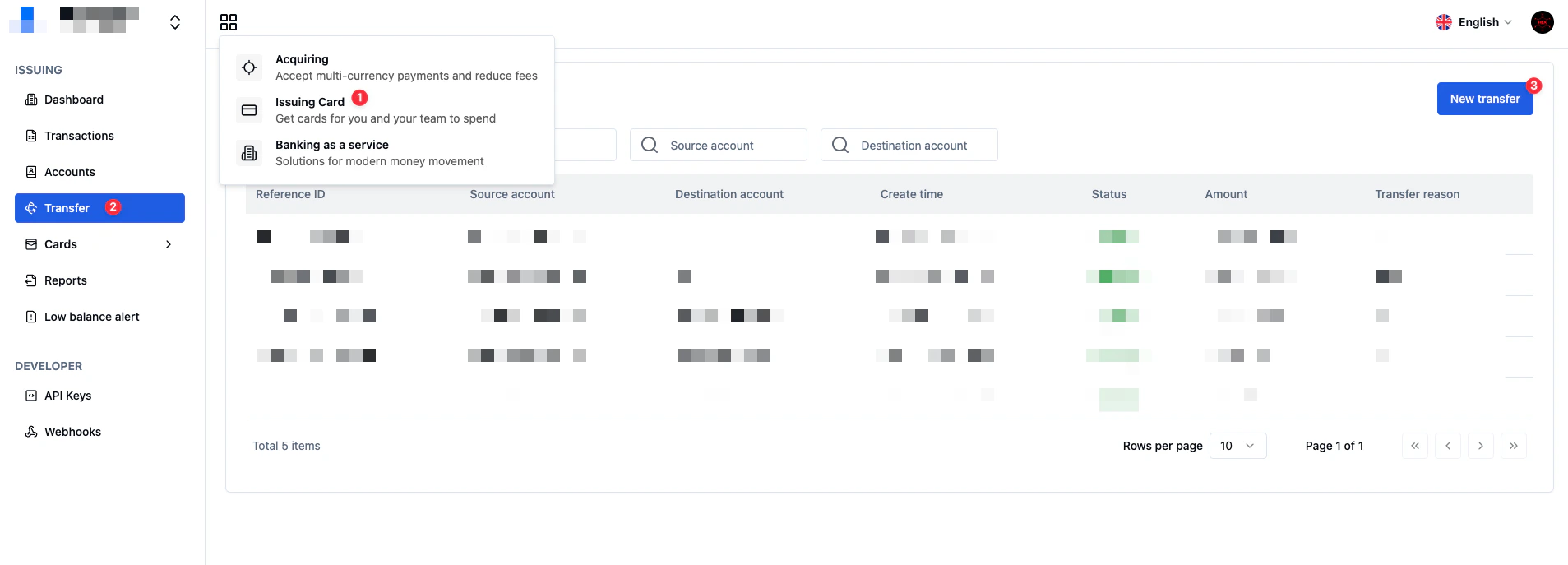
1. Navigate to the **Transfer** screen.
2. Click **New transfer** in the top-right corner.
3. Fill in source account, destination account, and currency.
4. Click **Create**.
 ## Check your issuing balance
Use the [Retrieve Issuing Balance](/card-issuance/v1.6/api-reference/retrieve-issuing-balance) or [List Issuing Balances](/card-issuance/v1.6/api-reference/list-issuing-balances) endpoints to check your current balance.
```bash theme={null}
curl "https://api-sandbox.uqpaytech.com/api/v1/issuing/balances?page_number=1&page_size=10" \
-H "x-auth-token: YOUR_API_TOKEN" \
-H "Content-Type: application/json"
```
## Manage card-level balances
### Recharge a card
Add funds to a card using the [Card Recharge](/card-issuance/v1.6/api-reference/card-recharge) endpoint.
* **Single mode**: Transfers funds from the issuing balance into the card.
* **Share mode**: Increases `card_available_balance` without transferring funds.
```bash theme={null}
curl -X POST https://api-sandbox.uqpaytech.com/api/v1/issuing/cards/{card_id}/recharge \
-H "x-auth-token: YOUR_API_TOKEN" \
-H "x-idempotency-key: $(uuidgen | tr '[:upper:]' '[:lower:]')" \
-H "Content-Type: application/json" \
-d '{"amount": 500}'
```
A `card.recharge.succeeded` [webhook](/card-issuance/v1.6/webhooks/card-recharged) fires upon completion.
### Withdraw from a card
Remove funds from a card using the [Card Withdraw](/card-issuance/v1.6/api-reference/card-withdraw) endpoint.
* **Single mode**: Returns funds from the card to the issuing balance.
* **Share mode**: Decreases `card_available_balance`.
```bash theme={null}
curl -X POST https://api-sandbox.uqpaytech.com/api/v1/issuing/cards/{card_id}/withdraw \
-H "x-auth-token: YOUR_API_TOKEN" \
-H "x-idempotency-key: $(uuidgen | tr '[:upper:]' '[:lower:]')" \
-H "Content-Type: application/json" \
-d '{"amount": 200}'
```
A `card.withdraw.succeeded` [webhook](/card-issuance/v1.6/webhooks/card-withdraw) fires upon completion.
## Related
* [Core concepts](/card-issuance/v1.6/guide/core-concepts) — Single vs. Share mode funding differences
* [Card Recharged webhook](/card-issuance/v1.6/webhooks/card-recharged)
* [Card Withdraw webhook](/card-issuance/v1.6/webhooks/card-withdraw)
* [List Issuing Balances API](/card-issuance/v1.6/api-reference/list-issuing-balances)
## Check your issuing balance
Use the [Retrieve Issuing Balance](/card-issuance/v1.6/api-reference/retrieve-issuing-balance) or [List Issuing Balances](/card-issuance/v1.6/api-reference/list-issuing-balances) endpoints to check your current balance.
```bash theme={null}
curl "https://api-sandbox.uqpaytech.com/api/v1/issuing/balances?page_number=1&page_size=10" \
-H "x-auth-token: YOUR_API_TOKEN" \
-H "Content-Type: application/json"
```
## Manage card-level balances
### Recharge a card
Add funds to a card using the [Card Recharge](/card-issuance/v1.6/api-reference/card-recharge) endpoint.
* **Single mode**: Transfers funds from the issuing balance into the card.
* **Share mode**: Increases `card_available_balance` without transferring funds.
```bash theme={null}
curl -X POST https://api-sandbox.uqpaytech.com/api/v1/issuing/cards/{card_id}/recharge \
-H "x-auth-token: YOUR_API_TOKEN" \
-H "x-idempotency-key: $(uuidgen | tr '[:upper:]' '[:lower:]')" \
-H "Content-Type: application/json" \
-d '{"amount": 500}'
```
A `card.recharge.succeeded` [webhook](/card-issuance/v1.6/webhooks/card-recharged) fires upon completion.
### Withdraw from a card
Remove funds from a card using the [Card Withdraw](/card-issuance/v1.6/api-reference/card-withdraw) endpoint.
* **Single mode**: Returns funds from the card to the issuing balance.
* **Share mode**: Decreases `card_available_balance`.
```bash theme={null}
curl -X POST https://api-sandbox.uqpaytech.com/api/v1/issuing/cards/{card_id}/withdraw \
-H "x-auth-token: YOUR_API_TOKEN" \
-H "x-idempotency-key: $(uuidgen | tr '[:upper:]' '[:lower:]')" \
-H "Content-Type: application/json" \
-d '{"amount": 200}'
```
A `card.withdraw.succeeded` [webhook](/card-issuance/v1.6/webhooks/card-withdraw) fires upon completion.
## Related
* [Core concepts](/card-issuance/v1.6/guide/core-concepts) — Single vs. Share mode funding differences
* [Card Recharged webhook](/card-issuance/v1.6/webhooks/card-recharged)
* [Card Withdraw webhook](/card-issuance/v1.6/webhooks/card-withdraw)
* [List Issuing Balances API](/card-issuance/v1.6/api-reference/list-issuing-balances)